|
|
VI. Mounting and Controlling the Camera
Once you have the other essential elements (e.g. kite and camera), you need some way of attaching the camera to the line and controlling it.
|
|
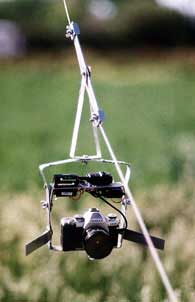 |
A. Attaching the camera. One of the big challenges of KAP is getting a stable platform on which to mount your camera. Today there seem to be two principal methods. One is a pendulum, generally an aluminum frame that swings from a clamp attached to your kite line. Some crafty people cut, drill, and bend their own into shape. I bought mine from Into the Wind for about $60.
|
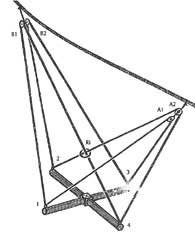 |
The alternative is the Picavet, which is an elaborate system of pulleys and line. It's meant to provide a more stable platform than a swinging pendulum. I made mine from parts I found at our local hardware store. They're adequate but heavy. As a basis for my picavet camera mount, I used Ralf Beutnagel's drawing and description in the now defunct Aerial Eye (vol 1, no. 5, fall 1995, pp. 6, 18). The model I used is pictured, with its line run in the following order: A1 - 1 - B1 - Ring -4 - A2 - Ring - 2 - 2B - 3 - A1. Even with this elaborate system, my camera was still tossed about by the wind, and I'm not convinced it's noticeably better.
|
|
|
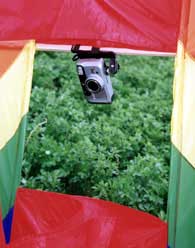
I've tried other ways of attaching a camera, but with little success. For example, I've attached a small camera with a timer to the horizontal spar (shown). One problem with this is that it affects the balance and stability of the kite itself. Another problem it the limited view from this position. I also tried attaching a camera between the kite and the tails. This so through the kite off balance that I wasn't even able to launch it.
Remember that with ground turbulence, a low flying kite can come down just as quickly as it goes up. For that reason, I wait until the kite's at least a hundred feet up before I attach the camera.
|
|
| |
B. Controlling the camera. Once you have your camera attached, you need to control how to trip the shutter and where the camera's pointed. There are a number of ways to release the shutter. Most involve some kind of timers. (One person uses a melting ice cube.) The problem with timers is that you never know where the camera will be when the picture's taken.
|
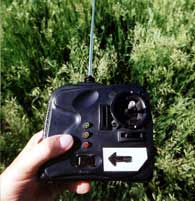 |
I prefer using a radio control device to trip the shutter. There are several expensive models made for cameras, but few if any have a range of a thousand feet needed for KAP. On the other hand, the remote control equipment for model airplanes seems to be much less expensive, and as one clerk told me, can control a model that's flown nearly out of sight. I've found a simple Hitec model RC kit on sale and have been happy with it. This kit contains two servos that would normally control the model's flaps. Instead, I use one to push the camera's shutter release. The only drawback I've found is that the joystick on the control is meant to move the model plane's rudder right or left and the tail flaps up or down. That means any one of these four directions could be used for my shutter release. On mine, moving the stick to the left trips the shutter. So I won't forget, I've put a left arrow on masking tape next to the stick.
|
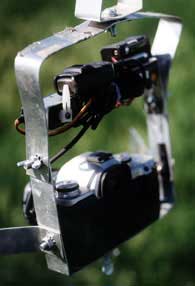 |
Originally I tried to use the second servo to pan the camera (that is, make it turn right or left). Some people have more elaborate systems that also control the tilt (up and down movement). The problem I had with this is that even with the aid of binoculars, I couldn't tell which way the camera was pointed once it was a few hundred feet away. I found it better to use a simpler mount with thumbscrews that allow me to tighten the pan and tilt angles of the camera before I launch it. I now first picture where my camera will be and which way it needs to be pointed once it gets there. I then take a series of pictures at different distances. I usually get at least a few pictures per roll with the view I imagined. This ability to visualize scenes only improves with practice.
|
|
|